
diff options
Diffstat (limited to 'README.md')
| -rw-r--r-- | README.md | 158 |
1 files changed, 140 insertions, 18 deletions
@@ -1,26 +1,43 @@ -This is a DOS disk driver for the CH375 "USB ISA adapter", mostly designed with the Pocket386/Book386 in mind. +This is a disk driver the CH375 "USB ISA adapter", mostly designed with the Pocket386/Book386 in mind. +It allows you to use USB pendrives (and other mass storage devices, like USB HDDs) +as if they were removable disks. There is already a good number of drivers out there, but as far as I can see they are all derivatives of the original one, and I got tired of all the obscure hangs and crashes. This driver is in OpenWatcom C and written from scratch using the datasheets, so it has a (hopefully different) new repertoire of bugs to play with. +The same abstraction (ch375.h) is used to provide drivers for multiple OSes +that work on the Pocket386/Book386: DOS, Win9x, and early Linux (~ 2.0/2.2). -Some features: +Hot plug/unplug is also supported, +but it will only be noticed the next time you access the drive. -* Can support multiple partitions. You can either show multiple drive letters (the number of drive letters is fixed at boot, though) +# Download + +Current version is 1.0 [📦 chu1_0.zip](https://depot.javispedro.com/dos/chu/chu1_0.zip). + +[Older versions are available here.](https://depot.javispedro.com/dos/chu/) + +[TOC] + +# DOS (MS-DOS, FreeDOS, etc.) + +Features on DOS platforms: + +* *Can support multiple partitions.* You can either show multiple drive letters (the number of drive letters is fixed at boot, though) and/or dynamically switch a single drive letter to a different partition from the command prompt. This does wonders to workaround the FAT16 2GG limit, as you can define a dozen FAT16 partitions and switch. -* On DOSes which support FAT32, can optionally show FAT32 partitions to the DOS. +* On DOSes which support FAT32, can optionally *show FAT32 partitions* to the DOS. -* I mostly ignore CHS addressing and focus on LBA. This makes it way more capable of handling non-DOS formatted USB pendrives, +* I mostly ignore CHS addressing and focus on LBA. This makes it way more capable of handling non-DOS partitioned USB pendrives, and is generally less of a pain. In theory this allows disks of up to 2TB (be mindful of partition size limits though). -If DOS asks for geometry, it gives whatever is on your current partition. +If DOS asks for geometry, it gives whatever is on the BPB of your current partition. * Supports just enough IOCTLs to make DOS 6.x format.com "work" (only to re-format existing partitions, since it will simply re-use geometry from whatever FAT is already there). -Note this is a DOS-level driver, so FDISK won't work (which expects a BIOS-level driver). +Note this is a DOS-level driver, so FDISK won't work (which expects a BIOS/int13-level driver). -* Build is for 386+, tested on pocket386/book386, but source builds on 8086. +* Build is for 386+, tested on pocket386/book386, but the source builds on 8086 at least. * Extensive (not included by default) verbose log over serial port. @@ -29,18 +46,13 @@ any benchmark in speed or memory usage, but it gets around. About 400KB/s on the I get with other drivers anyway; and around 7KiB of memory usage (the official driver sits at 4KiB). Hopefully much easier to experiment with than with the official one. -# Download - - -# Installation +## Installation ```` DEVICE=CHUDISK.SYS [options] ```` -## CHUDISK.SYS configuration options - Current options: * /P260 : IO port for CH375 (defaults to 0x260, as on the pocket386) @@ -53,7 +65,7 @@ Each drive letter will by default be mapped to a different partition in order. * /3 : show FAT32 partitions to the OS. Useful for OSes with native FAT32 support like FreeDOS. -# Usage +## Usage The program CHUD.EXE can be used to switch a CHUDISK.SYS managed drive letter to a different partition. E.g. @@ -68,16 +80,126 @@ C:\> CHUD D: Select partition in [1..3] range: ```` -Extended partitions, W95/LBA partitions are supported. Of course you can only select FAT16 partitions, -and perhaps FAT32 ones if lucky (DOS7.1, FreeDOS, etc.) or forced with /3. +Extended partitions, W95/LBA partitions are supported. +Only FAT partitions can be selected. +FAT32 partitions can also be selected on a DOS that supports them (DOS7.1, FreeDOS, etc.). Note the drive letters <-> partitions mapping is not persistent, and will in fact be reset if you reboot or disconnect the USB drive. -# Building +## Building Tested with OpenWatcom 2, build from any OS where OpenWatcom runs. ```` wmake all ```` + +If you add `debug=1`, then it will build debug versions which pass +all dlog/dprintf statements to the first serial port (but they are very slow). + +# Windows 9x + +On Windows 9x, the driver is a IOS port driver, which makes it appear as +a removable disk. Windows takes cares of parsing partition tables here. + +Note that because it is marked as removable, Windows disables caching, +so launching stuff from the USB disk will be very slow. + +By default, Windows *assigns 1 drive letter to removable drives*, but if the +drive is inserted before Windows starts, it will instead assign as many +letters as you have partitions. +You can also force Windows to assign more than one drive letter, or even +decide which drive letters you prefer for the partitions on your pendrive. +For that, go to Device Manager, Disk Drives, and select the CH375 USB Disk +as follows: + +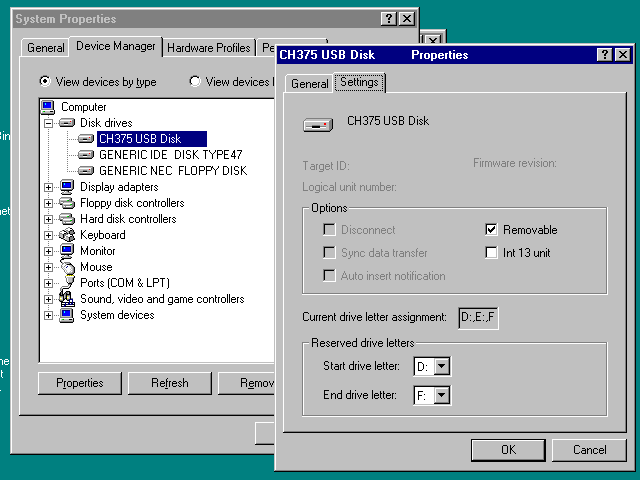 + +Partitions will be assigned to disk letters in order. + +## Installation + +You have to follow the usual procedure for non-PnP hardware in Win 9x. + +1. Go to the Add New Hardware Wizard in Control Panel. + +2. Say you do not want to do automatic detection, and select "Hard Disk Controller" +from the type of devices. + +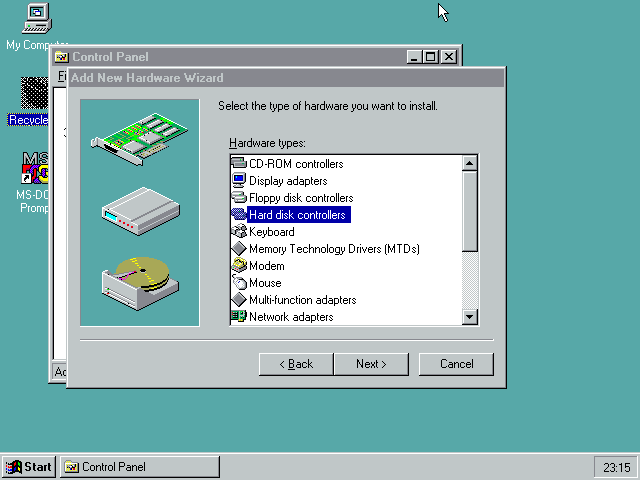 + +3. Use "Have Disk..." and point to the directory containing `chudisk.pdr` and +`chudisk.inf`. + +4. When asked, choose "CH375 USB Disk Controller" + +5. At this point Windows creates the device with some random default I/O port +settings. Do not reboot yet. + +6. Go to Device Manager, choose the CH375 Disk Controller device (not the disk). +In the Resources tab, you can configure the IO address to match whatever your +hardware is using. On the Pocket386/Book386, this is 0x260-0x261. + +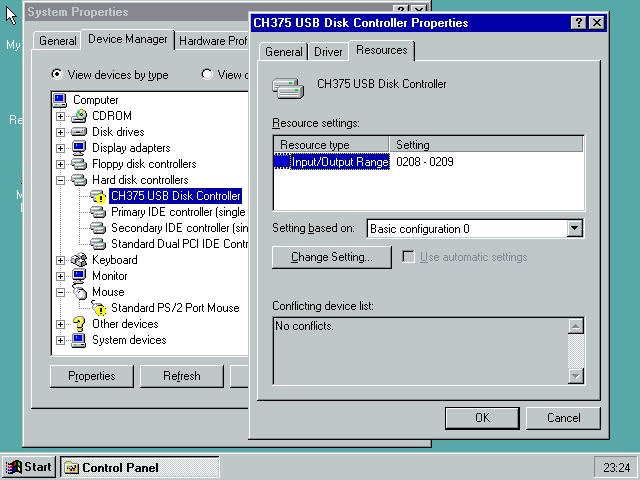 + +7. Windows will tell you that now you can shutdown the computer to install +your hardware. It's already installed, so reboot. + +## Building + +Uses OpenWatcom, same as DOS one. With `debug=1` , by default the debug log +goes into the IOS debug log, which will only be shown in the debug versions +of IOS. + +# Linux 2.0 - 2.2 + +No binaries are currently provided for Linux, since I find it easier to just +build for your distribution. You can even do that on-device. + +I have tested this on Debian Potato, with the latest 2.0 and 2.2 kernels. +Likely won't build on any other kernel version. + +## Installation / building + +Ensure that ``/lib/modules/`uname -r`/build`` exists, and that it points +to the kernel headers. +For Debian, this is usually a `kernel-headers-nnnn` package. +Note you cannot put a generic kernel source dump there, as it will lack the +usual headers generated during kernel build. + +```` +$ make +(as root:) +# make install +# ./mkdev.sh +(this will generate all /dev/chud* device files) +```` + +You can then use/mount the `/dev/chuda1`, `/dev/chuda2` devices as usual. + +## Usage + +Load in the usual way, or put into `/etc/modules`. E.g., + +```` +modprobe chudisk io=0x260 +```` + +The driver exposes the following parameters: + +* `io` the io address for your CH375, defaults to 0x260. +* `major` allows overriding the device's major number, in case you +have a conflict with the default (63). If you do this, also update `mkdev.sh`. +* `force` will load the driver even if we can't find a CH375 at the specified +address. +* `softblk` allows setting the "block size" used for transfers. +Linux defaults to 1024. Higher values provide higher throughput at the cost +of latency. Must be power of two, max is 4K. + +# Future work + +* Currently the driver is polling AND blocking in all OSes. Due to the +relative fast speed of most pendrives, the driver spends most of its time +doing PIO rather than waiting for the CH375, so I do not see the reason +to change this. Also, on Pocket386/Book386, the IRQ line is not wired. |