1
2
3
4
5
6
7
8
9
10
11
12
13
14
15
16
17
18
19
20
21
22
23
24
25
26
27
28
29
30
31
32
33
34
35
36
37
38
39
40
41
42
43
44
45
46
47
48
49
50
51
52
53
54
55
56
57
58
59
60
61
62
63
64
65
66
67
68
69
70
71
72
73
74
75
76
77
78
79
80
81
82
83
84
85
86
87
88
89
90
91
92
93
94
95
96
97
98
99
100
101
102
103
104
105
106
107
108
109
110
111
112
113
114
115
116
117
118
119
120
121
122
123
124
125
126
127
128
129
130
131
132
133
134
135
136
137
138
139
140
141
142
143
144
145
146
147
148
149
150
151
152
153
154
155
156
157
158
159
160
161
162
163
164
165
166
167
168
169
170
171
172
173
174
175
176
177
178
179
180
181
182
183
184
185
186
187
188
189
190
191
192
193
194
195
196
197
198
199
200
201
202
203
204
205
|
This is a disk driver the CH375 "USB ISA adapter", mostly designed with the Pocket386/Book386 in mind.
It allows you to use USB pendrives (and other mass storage devices, like USB HDDs)
as if they were removable disks.
There is already a good number of drivers out there, but as far as I can see they are all derivatives of the original one,
and I got tired of all the obscure hangs and crashes. This driver is in OpenWatcom C and written from scratch
using the datasheets, so it has a (hopefully different) new repertoire of bugs to play with.
The same abstraction (ch375.h) is used to provide drivers for multiple OSes
that work on the Pocket386/Book386: DOS, Win9x, and early Linux (~ 2.0/2.2).
Hot plug/unplug is also supported,
but it will only be noticed the next time you access the drive.
# Download
Current version is 1.0 [📦 chu1_0.zip](https://depot.javispedro.com/dos/chu/chu1_0.zip).
[Older versions are available here.](https://depot.javispedro.com/dos/chu/)
[TOC]
# DOS (MS-DOS, FreeDOS, etc.)
Features on DOS platforms:
* *Can support multiple partitions.* You can either show multiple drive letters (the number of drive letters is fixed at boot, though)
and/or dynamically switch a single drive letter to a different partition from the command prompt.
This does wonders to workaround the FAT16 2GG limit, as you can define a dozen FAT16 partitions and switch.
* On DOSes which support FAT32, can optionally *show FAT32 partitions* to the DOS.
* I mostly ignore CHS addressing and focus on LBA. This makes it way more capable of handling non-DOS partitioned USB pendrives,
and is generally less of a pain. In theory this allows disks of up to 2TB (be mindful of partition size limits though).
If DOS asks for geometry, it gives whatever is on the BPB of your current partition.
* Supports just enough IOCTLs to make DOS 6.x format.com "work"
(only to re-format existing partitions, since it will simply re-use geometry from whatever FAT is already there).
Note this is a DOS-level driver, so FDISK won't work (which expects a BIOS/int13-level driver).
* Build is for 386+, tested on pocket386/book386, but the source builds on 8086 at least.
* Extensive (not included by default) verbose log over serial port.
As usual, this driver is in OpenWatcom C, do not expect it to beat
any benchmark in speed or memory usage, but it gets around. About 400KB/s on the Book386, which is the same
I get with other drivers anyway; and around 7KiB of memory usage (the official driver sits at 4KiB).
Hopefully much easier to experiment with than with the official one.
## Installation
````
DEVICE=CHUDISK.SYS [options]
````
Current options:
* /P260 : IO port for CH375 (defaults to 0x260, as on the pocket386)
* /N1 : number of drive letters to allocate (defaults to just 1).
Each drive letter will by default be mapped to a different partition in order.
* /R : read-only mode. Writes to disk will fail.
* /3 : show FAT32 partitions to the OS. Useful for OSes with native FAT32 support like FreeDOS.
## Usage
The program CHUD.EXE can be used to switch a CHUDISK.SYS managed drive letter to a different partition.
E.g.
````
C:\> CHUD D:
Index Type Label Size
[1] fat16 USBPART1 1996 MB
[2] fat16 USBPART2 1996 MB
[3] fat32 USBPARTBIG 4726 MB
Select partition in [1..3] range:
````
Extended partitions, W95/LBA partitions are supported.
Only FAT partitions can be selected.
FAT32 partitions can also be selected on a DOS that supports them (DOS7.1, FreeDOS, etc.).
Note the drive letters <-> partitions mapping is not persistent, and will in fact be reset if you reboot
or disconnect the USB drive.
## Building
Tested with OpenWatcom 2, build from any OS where OpenWatcom runs.
````
wmake all
````
If you add `debug=1`, then it will build debug versions which pass
all dlog/dprintf statements to the first serial port (but they are very slow).
# Windows 9x
On Windows 9x, the driver is a IOS port driver, which makes it appear as
a removable disk. Windows takes cares of parsing partition tables here.
Note that because it is marked as removable, Windows disables caching,
so launching stuff from the USB disk will be very slow.
By default, Windows *assigns 1 drive letter to removable drives*, but if the
drive is inserted before Windows starts, it will instead assign as many
letters as you have partitions.
You can also force Windows to assign more than one drive letter, or even
decide which drive letters you prefer for the partitions on your pendrive.
For that, go to Device Manager, Disk Drives, and select the CH375 USB Disk
as follows:
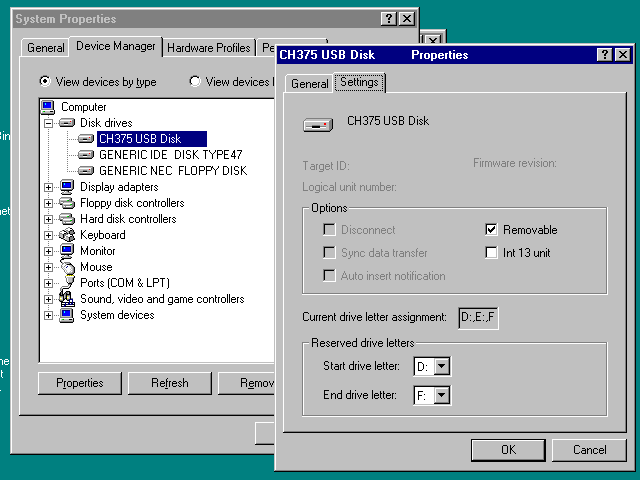
Partitions will be assigned to disk letters in order.
## Installation
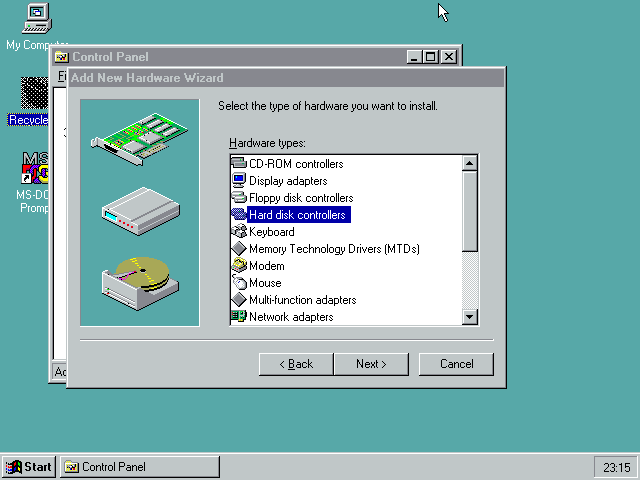
You have to follow the usual procedure for non-PnP hardware in Win 9x.
1. Go to the Add New Hardware Wizard in Control Panel.
2. Say you do not want to do automatic detection, and select "Hard Disk Controller"
from the type of devices.
3. Use "Have Disk..." and point to the directory containing `chudisk.pdr` and
`chudisk.inf`.
4. When asked, choose "CH375 USB Disk Controller"
5. At this point Windows creates the device with some random default I/O port
settings. Do not reboot yet.
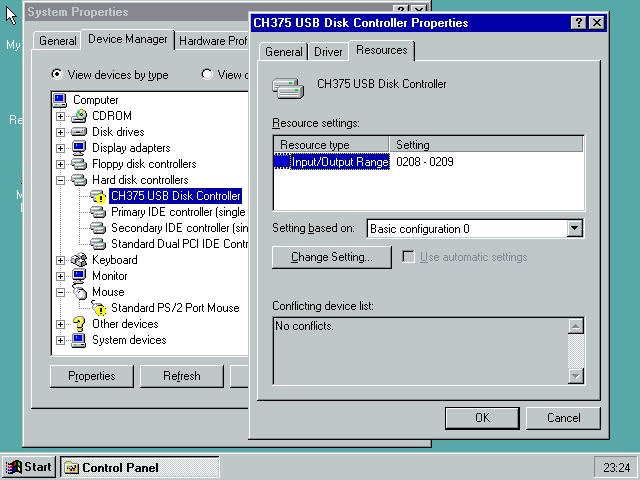
6. Go to Device Manager, choose the CH375 Disk Controller device (not the disk).
In the Resources tab, you can configure the IO address to match whatever your
hardware is using. On the Pocket386/Book386, this is 0x260-0x261.
7. Windows will tell you that now you can shutdown the computer to install
your hardware. It's already installed, so reboot.
## Building
Uses OpenWatcom, same as DOS one. With `debug=1` , by default the debug log
goes into the IOS debug log, which will only be shown in the debug versions
of IOS.
# Linux 2.0 - 2.2
No binaries are currently provided for Linux, since I find it easier to just
build for your distribution. You can even do that on-device.
I have tested this on Debian Potato, with the latest 2.0 and 2.2 kernels.
Likely won't build on any other kernel version.
## Installation / building
Ensure that ``/lib/modules/`uname -r`/build`` exists, and that it points
to the kernel headers.
For Debian, this is usually a `kernel-headers-nnnn` package.
Note you cannot put a generic kernel source dump there, as it will lack the
usual headers generated during kernel build.
````
$ make
(as root:)
# make install
# ./mkdev.sh
(this will generate all /dev/chud* device files)
````
You can then use/mount the `/dev/chuda1`, `/dev/chuda2` devices as usual.
## Usage
Load in the usual way, or put into `/etc/modules`. E.g.,
````
modprobe chudisk io=0x260
````
The driver exposes the following parameters:
* `io` the io address for your CH375, defaults to 0x260.
* `major` allows overriding the device's major number, in case you
have a conflict with the default (63). If you do this, also update `mkdev.sh`.
* `force` will load the driver even if we can't find a CH375 at the specified
address.
* `softblk` allows setting the "block size" used for transfers.
Linux defaults to 1024. Higher values provide higher throughput at the cost
of latency. Must be power of two, max is 4K.
# Future work
* Currently the driver is polling AND blocking in all OSes. Due to the
relative fast speed of most pendrives, the driver spends most of its time
doing PIO rather than waiting for the CH375, so I do not see the reason
to change this. Also, on Pocket386/Book386, the IRQ line is not wired.
|
